
Why Companies Invest in Bespoke Software Development Service

Many companies start with simple tools, but those tools can become harder to manage as the business grows. This blog explains why bespoke software development helps teams reduce manual work, connect scattered systems, improve data flow, and build software around the way the business actually works.
Smarter Workflows Start with These Generative AI Trends
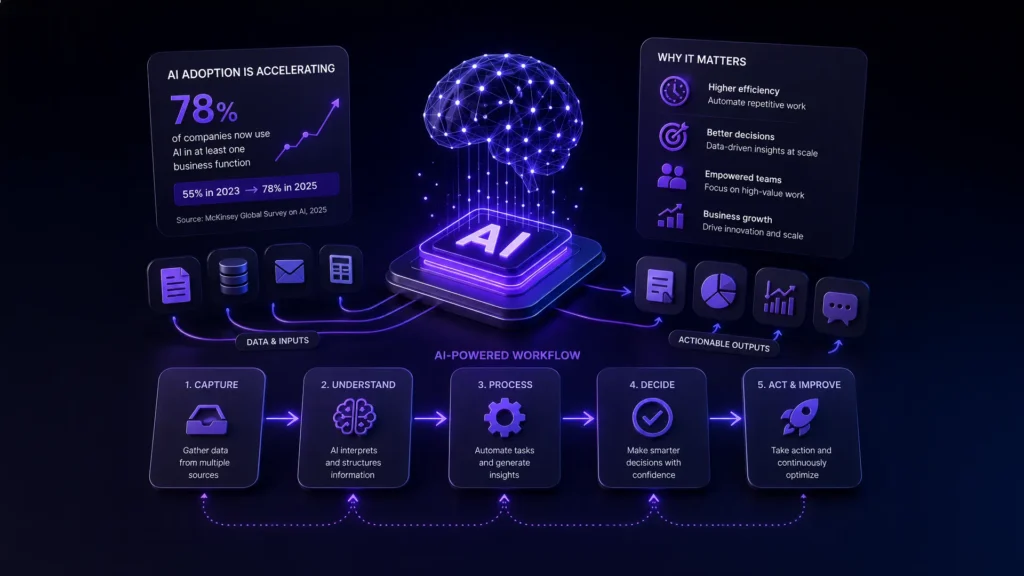
Generative AI used to be something you’d bolt onto a process here and there – a chatbot for support, a tool for drafting emails. That’s not really how it’s being used anymore. It’s becoming part of the actual workflow itself, not just a feature sitting on top of one. That’s a bigger shift than it sounds.
Why Dev Agencies Are Watching Claude Mythos AI Closely
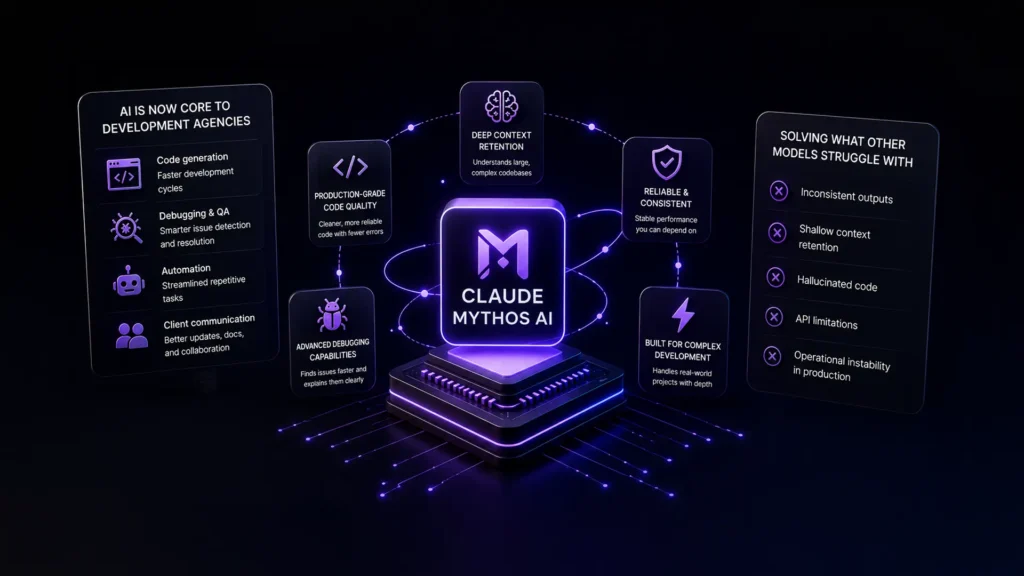
Artificial intelligence is no longer a side tool inside development agencies. It is becoming part of the operational infrastructure behind software delivery, product ideation, debugging, automation, and even client communication.
Claude AI Use Cases in Custom Software Projects

If your team is working with modern software development, Claude AI has likely already come up in discussions. It is now being evaluated by product teams, engineers, and technical leaders as part of real workflow decisions. The question is no longer whether AI should be tested. The real focus is on where it fits inside actual software systems and day-to-day development work. Most teams are not looking for another tool sitting in isolation. They are looking for ways to reduce friction in real problems like slow onboarding, legacy code complexity, repetitive development tasks, and time-consuming debugging. That is where Claude AI use cases become relevant in custom software projects, not as a chatbot but as a practical part of how software is designed, built, and maintained. So before we talk about use cases, it helps to understand what Claude actually is and how it fits into everyday software work. What Is Claude AI and How It Works At a simple level, Claude AI is a large language model built by Anthropic. That sounds technical, but the practical version is easier to understand. It reads information, understands context, and gives useful responses back. That information could be code, product requirements, API documentation, error logs, or even messy notes from a developer handoff. In real software work, teams spend a surprising amount of time not building features, but trying to understand what already exists before they can move forward. What does this service do? Why was this written this way? Where is this error actually coming from? Claude helps answer these questions faster, and sometimes that alone saves hours. How to Use Claude AI in Custom Software Workflows Many teams overthink AI adoption. They start by asking how to roll it out everywhere. That usually creates confusion. A better approach is simpler, and that is to start with one workflow that already feels slow or repetitive. Maybe documentation, debugging, or code review. That is usually the best way to know how to use Claude AI in a practical business setting. Most teams that successfully use Claude AI do not start big. They start with one use case, learn what works, and then expand from there. That usually leads to better long-term results. Why Developers Use Claude AI in Custom Software Most engineering teams are not short on talent. They are short on bandwidth. There is always too much happening at once. Product deadlines. Technical debt. Customer issues. Internal tools nobody wants to maintain but everyone depends on. So when teams start to use Claude AI, it is usually not because they want to replace engineers. It is because they want to remove some of that drag. Things like: writing repetitive code reviewing old modules drafting documentation investigating bugs creating tests nobody has time for Those jobs still need people. But they do not always need full human effort from the first minute. And this is where Claude fits well. Best Claude AI Use Cases in Custom Software Once teams move past experimentation, a few patterns show up again and again. These are usually where the real value appears. Code Generation for Structured Development Tasks This is one of the easiest wins. Claude works well with repetitive development tasks like: generating helper functions creating service templates writing reusable components Not fancy, but it could be significant. And honestly, developers usually appreciate not having to write the same boilerplate again. Refactoring and Improving Legacy Code Legacy systems are tricky. They often still work, which makes teams afraid to touch them. That fear slows everything down. Claude helps by reviewing older code and suggesting cleaner patterns or possible improvements. Not every suggestion will be right. But it helps the team to start the conversation. Sometimes that is the hardest part. Creating Test Cases and QA Scenarios Testing tends to get delayed. Not because teams do not care. Because deadlines happen. Claude can help generate early test scenarios, edge cases, and validation checks. That gives QA teams a better starting point. NIST Secure Software Development Framework continues to update its secure software guidance, with its Secure Software Development Framework project page refreshed as recently as April 2026. AI should support that, not replace it. Automating Technical Documentation Almost everyone agrees that documentation matters because nobody enjoys writing it. So it gets skipped. Then six months later, everyone regrets it. Claude can help teams turn technical work into readable docs much faster. That is not flashy. But it is genuinely useful if used properly. Optimizing Database Queries with Claude AI Sometimes the biggest performance issue is just one slow query hiding somewhere. Claude can review SQL and suggest improvements. Maybe a cleaner structure. Maybe a better index. It is not a database architect. But it helps teams think faster, and sometimes that is enough. Using Claude AI for Coding vs Traditional Tools At this point, many teams ask a fair question: if we already have strong development tools, why add Claude? The short answer is that it solves a different kind of problem. Traditional tools are excellent at enforcing rules and catching technical issues. Claude helps developers think through problems, understand context, and move faster when the work gets messy. A quick comparison makes that easier to see. If your team needs Traditional tools Claude AI Code accuracy Best for catching exact errors Helpful but needs review Large codebase understanding Mostly manual Faster context understanding Repetitive code Templates and snippets Faster first drafts Debugging Shows what failed Helps explain why Traditional tools help enforce the rules. Claude helps your team think through the work. That’s the reason to most teams do not choose one over the other. They use both usually, and that combination works best. Anthropic Claude AI Use Cases: Strengths and Limits Claude has clear strengths. It handles long context well. It reads large documents well. It explains technical ideas clearly. That is why teams like it. But it is not perfect. Sometimes it guesses, sounds confident, and still gets something wrong. And here,
Pull Request Best Practices to Improve Code Quality and Team Productivity

Modern software teams move fast. But speed without structure often leads to messy code, missed bugs, and frustrated developers. This is where a well-managed pull request process becomes essential. A strong review culture does not just fix code. It builds better teams, cleaner systems, and scalable products. What is a Pull Request and Why It Matters If you have ever wondered what a pull request is, the answer is simple. A pull request is a method used in version control systems where developers propose changes to a codebase before merging them into the main branch. It acts as a checkpoint. Instead of pushing code directly, developers submit a pull request so others can review, discuss, and approve it. This small step plays a huge role in maintaining consistency and catching issues early. In modern workflows, especially with Git-based platforms, pull requests are the backbone of collaboration. They help teams: Catch bugs before production. Maintain coding standards. Share knowledge across developers. Most importantly, they directly help improve code quality by adding a layer of accountability. Why Pull Requests Are Critical for Code Quality and Team Productivity Pull requests are not just a technical process. They shape how teams communicate. According to GitHub’s internal engineering studies, teams that actively use structured code reviews see fewer defects and faster onboarding of new developers. This is because knowledge is shared through every review. A good pull request process helps teams: Reduce production bugs. Improve long-term maintainability. Increase collaboration across roles. Without proper pull request practices, teams often face delayed releases, inconsistent code, and unclear ownership. Common Mistakes Developers Make with Pull Requests Even experienced developers make mistakes when handling pull requests. These issues slow down teams and reduce effectiveness. Some of the most common problems include: Submitting large and complex pull requests Writing vague or no descriptions Ignoring coding standards Delaying reviews or approvals Treating reviews as criticism instead of collaboration These mistakes reduce the impact of even the best pull request review best practices. Pull Request Best Practices for Developers Pull request best practices help developers streamline collaboration, improve code quality, and reduce errors. By following structured review processes, teams can ensure cleaner code, faster approvals, and more efficient development workflows. Keep Pull Requests Small and Focused Smaller pull requests are easier to review and understand. When changes are limited to a single feature or fix, reviewers can quickly validate the logic. This leads to faster approvals and fewer back-and-forth discussions. Large pull requests, on the other hand, often get delayed or rushed. Write Clear Descriptions and Context A pull request without context creates confusion. Always explain: What changes were made? Why were they needed? What impact do they have? This simple habit significantly improves the effectiveness of pull request best practices. Follow a Consistent Coding Standard Consistency is key to maintainable code. Teams that follow defined coding standards reduce friction during reviews. It also ensures that new developers can easily understand the codebase. This is one of the most overlooked ways to improve code quality. Link Issues and Documentation A good pull request connects the dots. Linking tickets, bugs, or documentation helps reviewers understand the bigger picture. It improves traceability and ensures nothing gets lost in the process. Pull Request Code Review Best Practices Pull request code review best practices help teams ensure high-quality, reliable code. By focusing on logic, providing clear feedback, and maintaining timely reviews, teams can improve collaboration, reduce bugs, and accelerate development. Review Code for Logic, Not Just Syntax Syntax errors are easy to catch with tools. The real value of a review lies in understanding the logic. Does the code solve the problem correctly? Is it scalable? Are there edge cases? Focusing on logic is a core part of pull request code review best practices. Provide Constructive and Actionable Feedback Code reviews should not feel like criticism. Instead of saying “this is wrong,” explain what can be improved and why. This creates a positive environment and encourages learning. Strong teams treat reviews as collaboration, not judgment. Use Automated Tools Alongside Manual Reviews Automation speeds things up. Tools like linters, test runners, and CI pipelines can catch basic issues before a human review. This allows developers to focus on deeper problems. Combining automation with human insight is key to effective pull request review best practices. Avoid Delays in the Review Process Slow reviews block progress. When pull requests sit idle, it delays releases and frustrates developers. Teams should define SLAs for reviews to maintain momentum. Fast feedback loops lead to better productivity. How to Improve Code Quality Through Pull Requests Pull requests are one of the most practical ways to improve code quality consistently when used with the right approach. Teams can maximize their impact by enforcing coding standards across all submissions, integrating automated testing into workflows, encouraging peer reviews to build shared ownership, and using CI/CD pipelines to validate every change. According to a SmartBear study on code review practices, lightweight reviews like pull requests can reduce defects by up to 80 percent when implemented effectively. Creating an Effective Pull Request Checklist Creating an effective pull request checklist ensures consistency, reduces errors, and speeds up reviews. It helps developers verify code quality, testing, documentation, and deployment readiness before merging changes into the main codebase. Code Quality and Standards Code follows team guidelines. Naming conventions are consistent. No unnecessary complexity. Testing and Validation Unit tests are included. Integration tests pass. Edge cases are handled. Documentation and Comments The code is easy to understand. Complex logic is explained. Relevant documentation is updated. Deployment Readiness Code is production-ready No breaking changes Dependencies are managed A checklist reduces errors and makes reviews faster and more reliable. Tools That Support Pull Request Review Best Practices Modern tools have made managing pull requests far more efficient and structured. Platforms like GitHub, GitLab, and Bitbucket provide built-in capabilities for collaboration, version control, and seamless review tracking, helping teams stay aligned throughout the development cycle. Popular platforms include: GitHub GitLab Bitbucket To further improve
App or Software for Business: What to Choose as You Scale

Choosing between an app or software that is custom-built and a ready-made solution is not just a technical decision. It is a business decision that affects growth, efficiency, and long-term costs. Many companies today struggle between flexibility and convenience. The right choice depends on your stage, industry, and operational complexity. Before diving into features, it helps to understand how the market behaves. Market Reality: What Businesses Are Actually Choosing Most startups begin with software packages because they are quick to deploy and affordable up front. Tools like QuickBooks, Salesforce, or Shopify are popular examples of a software package that works out of the box. However, as businesses scale, limitations start to show. According to a Gartner report, over 60% of growing mid-sized businesses invest in custom solutions within three years of scaling due to integration and flexibility challenges. This shift is not random. It is driven by operational friction. Target Market Analysis: Who Needs What? Not every business needs custom development from day one. The decision depends on operational maturity. Packaged software works best for: Startups with standard workflows Businesses with limited budgets Teams needing quick deployment Custom business apps are ideal for: Growing companies with complex processes Enterprises needing integration across systems Industries with compliance or unique workflows If your processes feel forced into a tool, it is a clear sign your business has evolved beyond basic solutions. Outgrowing standard tools often means your operations need more flexibility and alignment. This is when moving to a custom app or software becomes the smarter next step. Understanding Packaged Software A software package is pre-built software designed for mass use. It solves common business needs like accounting, CRM, or HR. Advantages of Software Packages Lower upfront cost Faster implementation Vendor support and updates Proven reliability For example, the benefits of integrated accounting software packages include automated bookkeeping, tax calculations, and compliance reporting. This reduces manual effort and human error. Limitations You Should Not Ignore Limited customization Subscription costs increase over time. Integration issues with other systems Features you do not use but still pay for Many companies end up stacking multiple tools. This creates inefficiencies instead of solving them. The Case for Custom Apps Custom business apps are built specifically for your operations. They are designed around your workflows instead of forcing your team to adapt. Why Businesses Move Towards Custom Solutions When off-the-shelf tools stop fitting, businesses look for flexibility. This is where custom app development for unique business challenges becomes relevant. A logistics company, for example, may need route optimization, live tracking, and inventory syncing in one system. No single software package can handle all of this effectively. Key Benefits of Custom Apps Let’s break this down clearly. 1. Tailored to Your Workflow Custom apps are built around how your business actually operates. This improves efficiency from day one. 2. Better Integration You can connect CRM, accounting, operations, and analytics into one system. 3. Scalability Unlike packaged tools, custom apps grow with your business. You do not need to switch platforms frequently. 4. Competitive Advantage You are not using the same tools as your competitors. This creates differentiation. 5. Automation Gains One of the biggest advantages is the custom app development workflow automation benefits: Reduced manual tasks Faster processing Fewer errors Improved team productivity McKinsey estimates that automation can increase productivity by up to 30% in operational workflows. Custom Apps vs Software Packages: A Practical Comparison Cost Higher upfront Lower upfront Flexibility High Limited Deployment Time Longer Quick Scalability Excellent Moderate Integration Seamless Often complex Ownership Full control Vendor dependent This table makes one thing clear. The decision is not about better or worse. It is about fit. Where Businesses Often Go Wrong Many companies jump straight into custom development without validating the need. Others stick too long with rigid software packages and lose efficiency. Here are common mistakes: Over-investing early in custom apps without product-market fit Ignoring long-term subscription costs of packaged tools Using multiple disconnected tools instead of an integrated system Not considering user adoption and training. The right approach is phased. A Smarter Approach: Hybrid Strategy Most successful businesses follow a hybrid model. Start with a software or app that solves immediate needs. Identify workflow gaps over time. Gradually build custom business apps for critical functions. This reduces risk while allowing flexibility. Example Consider a mid-sized retail brand. Initially, they used: Shopify for ecommerce QuickBooks for accounting A CRM tool for customer management As they grew, data silos became a problem. Inventory mismatches and delayed reporting affected decisions. They shifted to a custom solution integrating all systems into one platform. The result: 25% faster order processing Real-time inventory tracking Improved customer experience This is a classic case of moving from software packages to a unified custom system. When Should You Choose Custom Over Packaged? You should seriously consider custom development if: Your team uses workarounds daily. You rely on multiple disconnected tools. Your processes are unique to your industry. You are scaling rapidly. Data visibility is a challenge. If these sound familiar, packaged tools are likely slowing you down. Conclusion The debate between software package solutions and custom apps is not about trends. It is about alignment with business goals. Packaged tools are great for speed and simplicity. Custom apps are built for control and growth. The smartest businesses do not pick one blindly. They evolve their tech stack as they grow. If you are evaluating whether to stick with a software package or build a custom solution, SilverXis can help you make the right call. From strategy to execution, we design systems that fit your business, not the other way around. Talk to SilverXis today and build an app or software solution that actually works for your growth. FAQs What is real-time supply chain tracking? Using digital tools like IoT devices, GPS systems, and cloud platforms, real-time supply chain tracking lets businesses keep an eye on supply chain activities all the time. These tools give businesses real-time data that helps them keep track of
Custom-Built Software or SaaS: Which Is Right for Business?
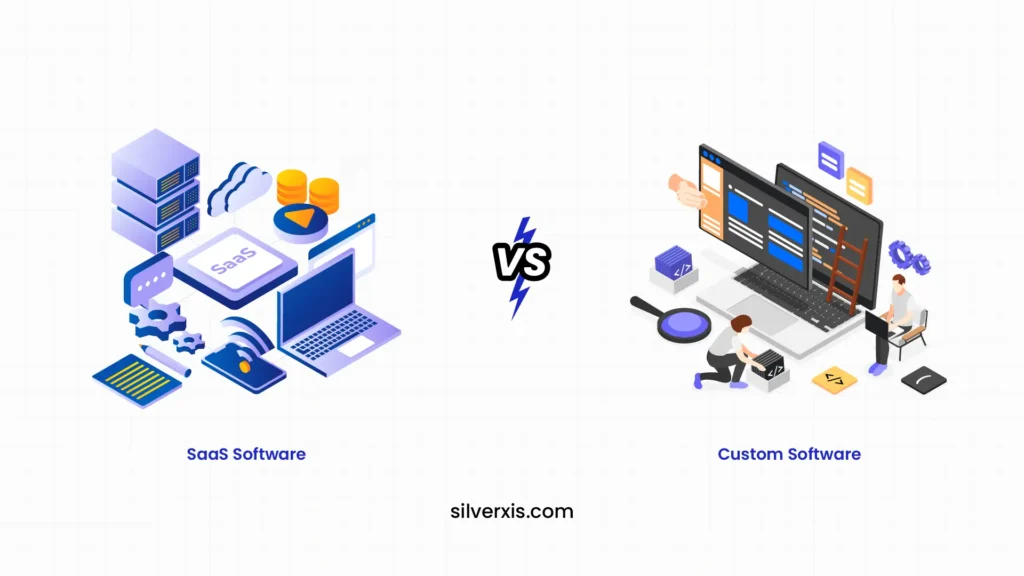
Most businesses don’t start with this question. It shows up later, usually when things stop working as smoothly as they once did. At the beginning, SaaS feels like the perfect answer. It is quick, affordable, and does the job. But as operations grow, teams expand, and workflows become complex, that same simplicity starts creating friction. That is when businesses begin to seriously evaluate whether custom built software makes more sense. Why SaaS Works So Well in the Beginning SaaS tools are designed for speed. You sign up and log in, and you are ready to go. No development cycles. No infrastructure setup. That is why early-stage companies rely heavily on tools like Shopify, HubSpot, or Slack. These are common examples of SaaS that solve immediate needs without requiring technical investment. The advantages of SaaS are clear. You get lower upfront costs, automatic updates, and minimal maintenance. For a business trying to move fast, that matters more than anything else. But over time, what made SaaS convenient can start to feel restrictive. When SaaS Starts Slowing You Down As your business grows, your needs become more specific. And SaaS, by design, is built for the masses. You might find yourself adjusting your workflow just to fit the tool. Or using multiple platforms that don’t integrate properly. Costs begin to rise as you add more subscriptions. Teams waste time switching between systems. At this stage, many businesses start exploring alternatives to SaaS. Not because SaaS is bad, but because it is no longer enough. This is also where the idea to migrate your SaaS solution to a custom-built software starts gaining traction. What Makes Custom-Built Software Different Custom-built software is not designed for everyone. It is designed for you. Instead of adapting your operations to fit a tool, the software is built around how your business actually works. That shift changes everything. Think about a logistics company creating its own routing system, or a fintech firm building a tailored analytics dashboard. These are practical custom-built software examples where the system becomes a core part of the business, not just a support tool. The Real Advantages of Custom Software The biggest strength of custom software is alignment. Every feature exists because your business needs it. You get better integration because all systems are designed to work together. You gain more control over your data and security. And most importantly, your software evolves as your business grows. These are not short-term wins. They are long-term gains. In fact, one of the biggest benefits of custom-built software for long-term growth is that it eliminates dependency on multiple external tools. Instead of paying for several subscriptions, you build one system that does exactly what you need. But Custom Software Isn’t Always the Right First Step It would be unrealistic to say custom is always better. Development takes time. It requires investment. And without the right strategy, it can become unnecessarily complex. For smaller businesses or those with standard workflows, SaaS still makes more sense. It solves problems quickly without heavy commitment. This is why the decision is not about what is better universally, but what fits your current stage. What Are Other Businesses Doing? If you look at the market, there is a clear pattern. Startups typically begin with SaaS because speed matters. Mid-sized companies often reach a tipping point where SaaS tools become limiting. That is when they start building internal systems or shifting toward hybrid models. Large enterprises rarely depend entirely on SaaS. They invest in custom-built software because control, scalability, and efficiency become critical at that level. So when you ask whether to buy SaaS or build custom software, you are really asking where your business sits in this journey. A Smarter Way to Think About the Decision Instead of choosing one over the other, many businesses are combining both. They continue using SaaS for non-core functions like HR or accounting. At the same time, they build custom solutions for areas that directly impact revenue or operations. This balanced approach reduces risk while still giving you the flexibility to scale. Conclusion SaaS gives you speed. Custom software gives you control. If your business is still finding its footing, SaaS is the practical choice. But if your growth is being limited by tools that cannot keep up, it might be time to invest in custom built software designed specifically for you. The real decision is not about technology. It is about how you want your business to operate in the long run. At SilverXis, we work with businesses to evaluate whether SaaS is still serving them or if it is time to transition toward more tailored solutions. From identifying gaps to building scalable systems, we help you move with clarity, not guesswork. If you are exploring the next step, we are here to help you build what actually fits. FAQs What is real-time supply chain tracking? Using digital tools like IoT devices, GPS systems, and cloud platforms, real-time supply chain tracking lets businesses keep an eye on supply chain activities all the time. These tools give businesses real-time data that helps them keep track of and control their operations. How does supply chain tracking software work? Supply chain tracking software collects operational data from multiple systems and technologies. The software analyzes this data and presents it through dashboards and analytics tools, helping organizations monitor supply chain performance and make better decisions. What technologies support real-time supply chain tracking? Technologies such as IoT sensors, GPS tracking, RFID systems, cloud platforms, and artificial intelligence help businesses enable real-time supply chain tracking. These technologies work together to improve supply chain visibility and operational efficiency. Why is real-time supply chain tracking important? Real-time supply chain tracking helps businesses see what’s going on in their operations better, find problems sooner, and make decisions more quickly. It also helps supply chain networks work together better. Using digital tools like IoT devices, GPS systems, and cloud platforms, real-time supply chain tracking lets businesses keep an eye on supply chain activities
Implementing a Custom FinTech Solution for Your Advisory Firm

The financial advisory space is shifting fast. Clients expect speed, clarity, and personalization. Legacy systems rarely deliver that. This is where custom fintech solutions step in. Instead of adapting your firm to software, you build software around your firm. That shift changes everything. From onboarding to reporting, every touchpoint becomes sharper and faster. To understand why tailored fintech solutions matter, let’s break this down properly. Understanding the Market Before Building Anything Before jumping into development, look at the current landscape. Most advisory firms rely on a mix of CRMs, portfolio tools, and spreadsheets. This creates silos. Data gets scattered. Decisions slow down. Now, here’s the real gap. Off-the-shelf tools are designed for broad use. Advisory firms need accuracy. Wealth management workflows are not identical to lending or insurance. This is why firms are moving toward custom fintech software solutions. They want control over features, integrations, and data flow. Competitor Analysis: What Others Are Doing Right and Wrong Let’s look at the competitive space. Large platforms like Salesforce Financial Services Cloud They offer deep functionality. But they are expensive and complex. Customization often requires external consultants. Wealth management tools like Addepar or Orion They provide strong analytics. But flexibility is limited. Integrating niche workflows becomes difficult. Emerging fintech startups They focus on user experience. But many lack scalability or regulatory depth. Here is the pattern. No single platform solves everything, which often forces firms to stitch multiple tools together. This approach increases costs and reduces overall efficiency. That is where the real opportunity lies. A well-built custom fintech software solution eliminates this dependency by connecting every function within a single, unified system. Target Market: Who Needs This the Most Not every firm needs custom solutions immediately. But certain segments benefit faster. Mid-sized advisory firms – They are growing but constrained by tools. They need scalable systems. RIA firms and wealth managers – They handle complex portfolios. They need tailored dashboards and reporting. Fintech-driven advisory startups – They want differentiation. Custom systems help them stand out early. Enterprise advisory firms – They need compliance-heavy workflows. Off-the-shelf tools rarely fit their regulations. If your firm falls into these categories, custom development becomes less of a luxury. It becomes necessary. What Goes Into Custom FinTech Software Development Let’s get practical. Building software is not just about features. It is about solving real problems. A strong custom fintech software development process usually includes: Workflow mappingUnderstand how your firm operates daily. Map every step. Identify inefficiencies. Data architecture planningDecide how data flows across systems. This is critical for analytics and compliance. UI and experience designAdvisors need speed. Clients need clarity. Both must be considered. Integration layerConnect banking APIs, CRMs, and reporting tools. Avoid data silos. Security and complianceFinancial data needs strict protection. Follow regional regulations carefully. Skipping any of these steps leads to long-term issues. Where Customer Journey Analytics Fits In Most advisory firms underestimate this. But it is a game-changer. Understanding how clients interact with your services helps refine strategy. This is where effective strategies for customer journey analytics in fintech come in. Here’s a simple example. A firm noticed clients dropped off during onboarding. Data showed the KYC process was too long. They redesigned the flow. Completion rates increased by 35%. That is the power of analytics. You can track: Client onboarding time Investment decision patterns Communication preferences Drop-off points in workflows When combined with custom fintech software development services, analytics becomes actionable. You do not just collect data. You use it to improve outcomes. Key Features Your Custom Solution Should Include Not all features are necessary. Focus on what creates value. Client dashboard – Clear portfolio insights. Easy to understand. No clutter. Advisor workspace – Quick access to client data. Faster decision-making tools. Automated reporting – Reduce manual work. Ensure consistency. Compliance tracking – Stay aligned with regulations. Avoid penalties. Integration with financial APIs – Real-time data improves accuracy. Each feature should solve a real problem. Avoid adding unnecessary complexity. Cost Considerations: Is It Worth It? Let’s address the obvious question. Yes, custom solutions cost more upfront. But long-term ROI is higher. Here is why: Reduced manual work Lower dependency on multiple tools Better client retention Faster decision cycles When you compare this to subscription costs of multiple platforms, custom solutions often win. Common Mistakes to Avoid Many firms rush into development. That creates problems later. Building without a clear roadmap – Leads to feature overload and confusion. Ignoring user feedback – Advisors and clients must be involved early. Overcomplicating design – Simple systems perform better. Underestimating compliance needs – This can create legal risks. A structured approach prevents these issues. Why Firms Are Choosing Custom Over Ready-Made Tools The shift is clear. Firms want ownership. They want flexibility. With custom fintech solutions, you can: Adapt quickly to market changes. Build unique client experiences. Scale without limitations Maintain control over data. This is not just about technology. It is about competitive advantage. How Silverxis Helps Advisory Firms Build Better Systems This is where the right partner matters. Silverxis focuses on building tailored fintech systems. Not generic platforms. They combine strategy, design, and engineering. The goal is simple. Create systems that actually work for your business. From planning to deployment, their approach is structured and practical. Whether you need full-scale development or optimization, Silverxis supports every stage. Conclusion Advisory firms are entering a new phase. Clients expect more. Markets move faster. Relying on outdated systems is risky. Growth demands better tools. Investing in custom fintech software solutions is not just a tech decision. It is a business decision. If you want clarity on how to build the right system, start with a proper evaluation. Silverxis can help you map your requirements and build a solution that fits your firm perfectly. FAQs What is real-time supply chain tracking? Using digital tools like IoT devices, GPS systems, and cloud platforms, real-time supply chain tracking lets businesses keep an eye on supply chain activities all the time. These tools give businesses real-time data that helps them
How to Build Custom Fleet Management Software for Your Business

If you run a logistics, construction, or delivery business, you already know one thing: off-the-shelf tools rarely fit perfectly. They either lack flexibility or overload you with features you never use. That’s exactly why many companies are now investing in custom fleet management software built around their actual operations instead of forcing operations to fit the software. But building one is not just about writing code. It’s about understanding workflows, customers, costs, and scalability. Let’s break it down properly, starting with deciding if custom software truly fits your business. First, Understand Who Really Needs Custom Fleet Software Not every business needs to go custom. Small fleets with simple routes can survive with SaaS tools. But if you fall into any of these categories, custom becomes a smart move: Logistics companies managing dynamic routes Construction businesses use construction fleet management software for heavy equipment Enterprises needing advanced reporting and compliance Companies handling last-mile delivery with strict SLAs For example, a construction company managing cranes, dump trucks, and fuel usage cannot rely on generic tracking tools. They need integrations with maintenance logs, fuel analytics, and safety compliance systems. That’s where custom fleet management solutions start delivering real value. Market Reality Check: What Competitors Are Offering Before building anything, it’s important to understand the competitive landscape. Key players in the market: Verizon Connect Samsara Geotab Fleet Complete What they do well: Real-time GPS tracking Driver behavior monitoring Basic route optimization Mobile dashboards Where they fall short: Limited customization Expensive scaling for enterprise needs Rigid workflows Integration challenges with internal systems According to a report by MarketsandMarkets, the fleet management market is expected to reach over $52 billion by 2027, driven by demand for efficiency and automation. Yet, most enterprise clients complain about a lack of flexibility. That gap is exactly where custom solutions win. Step 1: Define Your Core Use Cases Clearly Do not start with features. Start with problems. Ask: What slows down operations today Where are costs leaking What data do you wish you had For example: A delivery company may want Google Maps custom routing solutions for fleet management to reduce fuel costs. A service fleet may prioritize customer updates and tracking. A construction company may focus on equipment usage analytics. This step ensures your system is built around outcomes, not assumptions. Step 2: Prioritize Customer Experience from Day One Fleet software is not just about vehicles. It directly impacts customers. In fact, how fleet management solutions enhance customer service in the USA is becoming a major differentiator. Here’s how: Real-time tracking improves delivery transparency. Automated notifications reduce customer anxiety. Faster routing improves delivery times. Predictive maintenance prevents service delays. A McKinsey study shows that companies improving logistics visibility can increase customer satisfaction by up to 20%. Your software should enhance customer experience, not just manage fleets. Step 3: Design the Right Feature Stack Now comes the technical planning. A strong custom fleet management software typically includes: 1. Real-Time Tracking GPS integration Live vehicle status Geo-fencing alerts 2. Route Optimization Using Google Maps custom routing solutions for fleet management, you can: Reduce idle time Avoid traffic congestion Optimize fuel consumption 3. Fleet Analytics Dashboard Fuel usage Driver performance Vehicle utilization 4. Maintenance Management Scheduled servicing Breakdown alerts Spare parts tracking 5. Customer Interface This is often ignored but critical: Live tracking links Delivery ETA notifications Feedback systems This is where enterprise fleet management customer service becomes measurable and scalable. Step 4: Decide Build vs Integrate You do not need to build everything from scratch. A practical approach: Build core logic and workflows. Integrate APIs for maps, payments, and analytics. For example: Google Maps API for routing IoT devices for vehicle tracking Cloud platforms for data storage This reduces development time and cost while maintaining flexibility. Step 5: Understand Fleet Management Software Pricing Let’s be realistic. Cost is always a deciding factor. Typical pricing breakdown: Basic SaaS tools: $20 to $60 per vehicle per month Advanced enterprise tools: $80 to $150 per vehicle per month Custom solution: Higher upfront cost, lower long-term cost While fleet management software pricing for custom builds may seem expensive initially, it becomes more economical as your fleet grows. Why? No recurring license fees Full control over features Scalability without vendor dependency Think long-term, not just upfront investment. Step 6: Build for Scalability, Not Just Today One of the biggest mistakes businesses make is building for current needs only. Your software should handle: Fleet expansion Multi-location operations Integration with ERP or CRM systems Data growth over time For example, a company starting with 20 vehicles might scale to 200 within two years. Your system should not require a rebuild at that stage. Step 7: Test with Real Operations Before Full Launch Never rely only on technical testing. Run pilot programs: Select a small fleet segment. Monitor performance Collect driver feedback Identify usability gaps Drivers and operators often highlight issues that developers miss. This step ensures your custom fleet management solutions actually work in real-world conditions. Who Benefits Most from Custom Fleet Software Not every industry benefits equally. Here’s where custom solutions create the most impact: High-impact industries: Logistics and delivery companies Construction and heavy equipment businesses Field service companies Rental and leasing fleets Why they benefit: Complex workflows High operational costs Strong need for optimization Direct impact on customer satisfaction For instance, construction fleet management software can reduce idle equipment costs significantly, which often accounts for 30 to 40% of total project expenses according to industry estimates. The Real Advantage: Control and Adaptability Let’s be honest. The biggest benefit is not just efficiency. It is controlled. With custom software: You decide on features. You control data You adapt quickly to market changes. In contrast, off-the-shelf tools force you to adapt to them. This difference becomes increasingly important as your business grows. Conclusion Building custom fleet management software is not a luxury anymore. It is becoming a competitive necessity, especially for businesses that rely heavily on logistics, field operations, or equipment management. Done right, it reduces costs,
How Property Management Automation is Changing Real Estate

The real estate industry is no longer just about location, pricing, and tenant relationships. It is increasingly about efficiency, data, and systems that can scale operations without increasing workload. This is where property management automation is quietly reshaping how landlords, property managers, and real estate firms operate. From handling rent collection to managing maintenance workflows, an automated property management system is becoming less of a luxury and more of a necessity. But what is really driving this shift, and who stands to benefit the most? Let’s break it down. The Shift Toward Automation in Property Management Traditionally, property management relied heavily on manual processes. Spreadsheets for rent tracking, phone calls for maintenance requests, and paperwork for lease agreements. This approach worked when portfolios were small, but as property businesses scale, inefficiencies multiply. Automation changes this equation. A well-designed system can: Automate rent reminders and payments Track maintenance requests in real time Generate financial reports instantly. Manage tenant communication centrally. This is where property management workflow automation becomes critical. It connects every operational piece, reducing human error and saving time. According to a McKinsey report on automation trends, up to 60% of current work activities could be automated using existing technology. While not all apply directly to real estate, the implication is clear. There is massive untapped efficiency in property operations. Who Is Driving Adoption? The adoption of property management automation is not uniform. Different segments are embracing it at different speeds. 1. Mid-sized Property Management Firms These firms feel the most pressure. They manage enough properties to experience inefficiencies, but often lack enterprise-level resources. Automation helps them scale without hiring aggressively. 2. Real Estate Investors with Growing Portfolios Individual investors managing multiple properties are turning to automation to avoid operational burnout. 3. Large Real Estate Enterprises For them, the focus is on system integration and analytics. They rely heavily on property management system integration to connect CRM, accounting, and leasing tools. Competitor Landscape: What the Market Offers Before diving deeper, it helps to understand what current solutions are doing. AppFolio and Buildium These platforms dominate the market with strong accounting and tenant management capabilities. They offer several property management system features like online rent payments and reporting dashboards. Yardi Known for enterprise-level solutions, Yardi focuses on scalability and deep analytics, especially in financial reporting and compliance. TenantCloud A more affordable option targeting smaller landlords, offering basic automation tools. The Gap While these platforms are robust, many users report: Limited customization Complex onboarding Weak integration capabilities This gap is where newer, more flexible solutions are emerging. Brands like Silverxis are focusing on smarter automation, better user experience, and deeper integration capabilities. Key Features That Are Redefining Property Management Systems Not all automation tools are created equal. The real transformation comes from advanced capabilities that go beyond basic task automation. 1. Smart Financial Management Modern systems include advanced features in property management accounting systems, such as: Automated reconciliation Real-time financial dashboards Tax-ready reporting This eliminates the need for manual bookkeeping and reduces compliance risks. 2. Centralized Key and Access Management Managing access to properties can be chaotic, especially for large portfolios. Digital solutions for property management key systems allow the following: Secure access control Tracking of entry logs Remote key management This is particularly valuable for co-living spaces and commercial properties. 3. Seamless Integration A standalone system is no longer enough. Businesses need tools that connect. Strong property management system integration ensures: CRM systems sync with tenant data Accounting tools align with transactions. Maintenance platforms update in real time. This creates a unified ecosystem instead of isolated tools. 4. Workflow Automation at Scale Automation is not just about saving time. It is about consistency. With property management workflow automation, tasks like lease renewals, inspections, and communication follow predefined processes, ensuring nothing falls through the cracks. Where Intellectual Property Systems Fit In At first glance, an intellectual property management system might seem unrelated to real estate. However, for large firms and proptech companies, it plays a crucial role. Real estate businesses increasingly rely on proprietary software, branding assets, and digital tools. Managing these assets efficiently ensures: Protection of proprietary technology Streamlined licensing and compliance Better control over digital infrastructure For companies building custom property tech solutions, integrating intellectual property management becomes a strategic advantage. Real-World Impact: What Changes on the Ground Let’s move away from theory. Imagine a property manager handling 200 units manually. Daily tasks include: Tracking rent payments Coordinating maintenance Responding to tenant queries Now introduce an automated property management system. Suddenly: Rent is collected automatically with reminders. Maintenance tickets are logged and assigned instantly. Tenants receive updates without manual follow-ups. The result is not just time saved. It is a shift in how property managers work. They move from reactive problem-solving to proactive management. Challenges to Consider Before Adopting Automation Automation is powerful, but it is not plug-and-play. 1. Initial Setup Complexity Data migration and system configuration can take time. 2. Cost Concerns While automation saves money long term, upfront investment can be a barrier. 3. Resistance to Change Teams accustomed to manual processes may take time to adapt. The key is choosing a system that balances functionality with usability. This is where newer platforms are gaining attention. What the Future Looks Like The next wave of property management systems will likely include: AI-driven tenant insights Predictive maintenance analytics Voice-enabled operations Deeper financial intelligence Automation will not just support operations. It will drive strategic decision-making. And as competition increases, firms that fail to adopt property management automation risk falling behind. Conclusion Real estate is evolving, and operations are at the center of that transformation. The shift toward automation is not just about convenience. It is about staying competitive in a market that demands speed, accuracy, and scalability. Choosing the right system matters. Platforms like Silverxis are redefining how automation is implemented, focusing on flexibility, integration, and user-centric design. Whether you are managing a handful of properties or a large portfolio, investing in the right technology can fundamentally change how